

Google Business Profile SEO: The Complete Guide to Ranking in Google Maps and the Local Pack

Google Business Profile SEO: The Complete Guide to Ranking in Google Maps and the Local Pack
Oct 7, 2026 · @Yassin
When someone nearby searches for what you sell, Google usually answers with a map and three businesses before it shows a single website. If your business isn’t in those three, most of those customers never see you.
That map section is powered by Google Business Profile (formerly Google My Business). Optimizing it is one of the fastest, cheapest ways for a local business to get more calls, direction requests and walk-ins. Yet most profiles are set up once and then forgotten.
This guide walks you through Google Business Profile SEO from start to finish. You’ll learn:
- How Google decides which businesses show up in the map results
- Exactly what to fill in on your profile, field by field
- How to earn reviews that actually move rankings
- How your website and your profile work together
- What to do if you manage more than one location
- A 30-day plan you can start today
No fluff and no keyword tricks. Just the steps that work, in the order that matters.
Quick note on names: Google renamed Google My Business to Google Business Profile in 2021. People still search for both terms, so you’ll see them used interchangeably here. They mean the same thing.
What Is Google Business Profile SEO?
Google Business Profile SEO is the work of making your free Google listing show up higher, more often, for the searches your customers make. It covers the map results (the “local pack”), Google Maps itself, and the knowledge panel that appears when someone searches your business by name.
It is related to website SEO, but it is not the same thing. Website SEO is about ranking a page in the ten blue links. Google local listing SEO is about ranking a business on a map. Different results, different signals, and often a different set of competitors.
And people are actively looking for help with it. Business owners search for this topic in at least a dozen different ways every month:
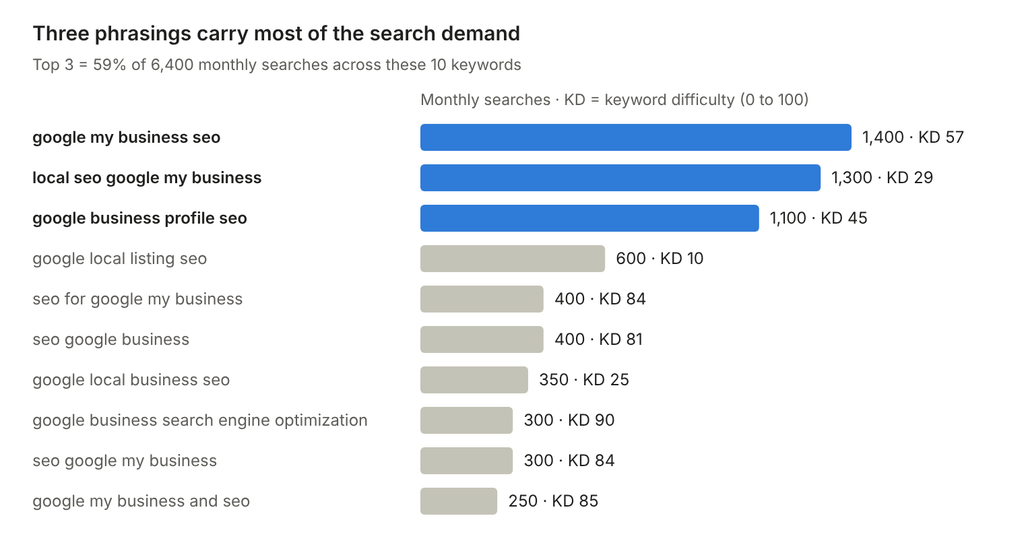
Two things stand out in that data. First, people still say “Google My Business” years after the rename, so the old name matters. Second, phrasings like “google local listing seo” (difficulty 10) and “local seo google my business” (difficulty 29) are much easier to rank for than the generic “SEO for Google My Business” terms. If you run a local business, the takeaway is simple: your competitors are researching this right now.
What GBP SEO controls
Your profile influences how you appear in three places:
- The local pack: the map plus three businesses shown on a normal Google search like “plumber near me.”
- Google Maps: the full list of results when someone searches inside the Maps app.
- Your branded knowledge panel: the box on the right (or top on mobile) when someone searches your business name. This is where they check your hours, reviews and phone number before calling.
Get these right and you win customers at the exact moment they are ready to buy.
Does Google My Business Help SEO?
Yes, and for local businesses it is often the single biggest lever. Here’s why.
For searches with local intent (“dentist near me,” “IT support Miami,” “emergency plumber”), Google usually shows the map pack above the regular website results. That means a well-optimized profile can put you on top of page one even if your website isn’t ranking yet.
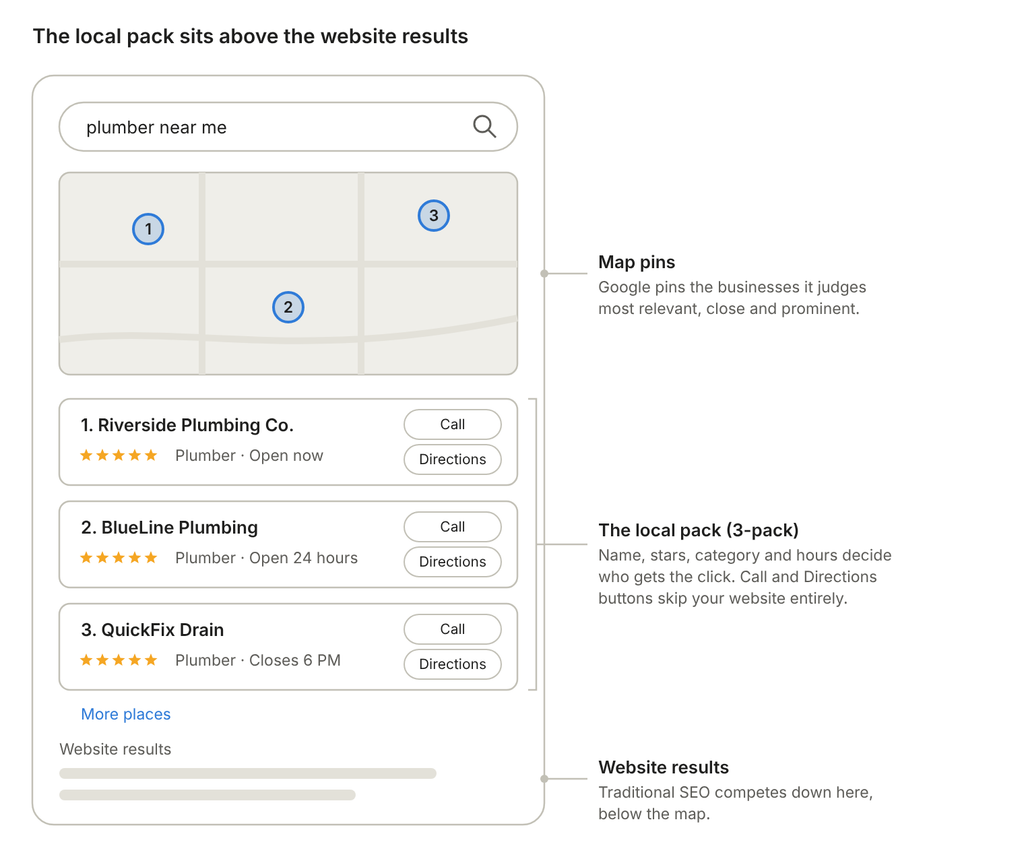
Look at what a searcher sees in that pack: your name, your star rating, your category, whether you’re open, and buttons to call or get directions. Many customers make their choice right there, without ever visiting a website.
So does Google My Business help SEO? It helps in three ways:
- Direct visibility: your profile ranks on its own in the map pack and Google Maps.
- Trust signals: reviews, photos and complete info make people pick you over the listing next to you.
- Support for your website: a profile that links to your site sends traffic and confirms your business details, which helps your overall local presence.
One caveat: the profile alone won’t carry you forever. The strongest local rankings come from a profile and a website working together. We’ll cover that in the website section below.
How Google Ranks Local Listings
Google has said publicly that local results are based on three things: relevance, distance and prominence (Google’s guidance on local ranking). Everything in Google business profile SEO comes back to one of these three.
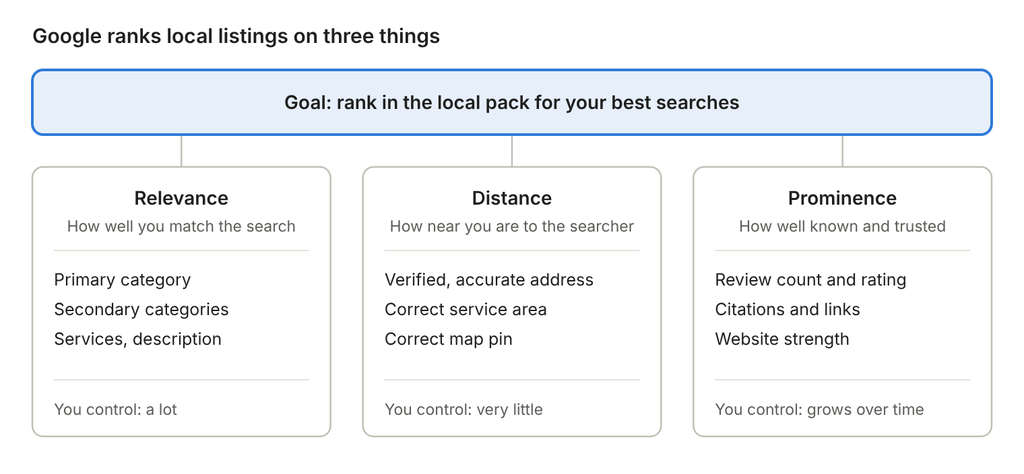
Relevance is how well your profile matches what someone searched. If a person types “water heater repair” and your profile only says “Plumber” with no services listed, Google has less reason to show you. Categories, services, your description and even the words customers use in reviews all feed relevance.
Distance is how far you are from the searcher, or from the location in their search. You can’t move your business, and you shouldn’t try to fake it with virtual offices or extra addresses. That breaks Google’s guidelines and can get your profile suspended. What you can do is make sure your address, pin and service area are correct.
Prominence is how well known your business is, online and offline. Google looks at review count and rating, links and mentions across the web, and the strength of your website. This is the factor that separates the top three from everyone else once relevance and distance are close.
The practical lesson: you can’t control distance, so win on the two you can. Most of the steps below boost relevance or prominence.
How to Optimize Your Google Business Profile, Step by Step
This is the core of Google business listing SEO. Work through these in order. The early steps carry the most weight, so don’t skip ahead to posts and photos before your categories and details are right.
Step 1: Claim and verify your profile
Search for your business on Google Maps. If a listing exists, claim it. If not, create one at business.google.com. Then complete verification, which today often means a short video showing your location, signage and tools of your trade.
Unverified profiles rank poorly or not at all. Verification is also what lets you edit your info and respond to reviews, so treat it as step zero.
Step 2: Choose the right primary category
Your primary category is one of the strongest relevance signals you have. It tells Google what you are. Pick the most specific category that matches your main service. “Personal Injury Attorney” beats “Lawyer.” “Computer Support and Services” beats “Consultant.”
Not sure which to choose? Search your main keyword and check what category the top three businesses use. That’s usually the category Google already associates with that search.
Then add secondary categories for other real services you offer. Don’t add categories for things you don’t do. They can trigger rankings for searches you can’t convert, and they dilute your main signal.
Step 3: Use your real business name
It’s tempting to add keywords: “Joe’s Plumbing – Best Emergency Plumber Miami.” Don’t. Google’s guidelines say your name must match your real-world name, as shown on your signage and branding. Competitors can report stuffed names, and suspensions are common.
If you want a keyword in your name, the honest route is to make it part of your legal or brand name and your signage. Otherwise, let categories and services do the work.
Step 4: Make your NAP consistent everywhere
NAP means name, address and phone number. These details should be identical on your profile, your website and every directory that lists you. “Suite 200” on one site and “#200” on another is minor. A different phone number or an old address is not. Inconsistent details make Google less confident about where you are and who you are.
If you serve customers at their location (like plumbers or IT support companies) and don’t receive visitors, set yourself up as a service-area business and hide your address. List the cities or regions you actually serve.
Step 5: Fill in services and products
This section is underused and powerful for relevance. Add every service you offer as its own item, with a short description that uses the words customers search. A dental office might list “Teeth Whitening,” “Dental Implants” and “Emergency Dental Care” separately instead of one line that says “General Dentistry.”
The same goes for products. Add your key products or packages with photos, descriptions and prices where you can.
Step 6: Write a description for humans first
You get 750 characters. Use the first two sentences to say what you do, who you serve and where. Then cover what makes you different: years in business, guarantees, certifications, response times.
Include your main service naturally once or twice. Don’t list ten cities or repeat keywords. A good test: would you be happy reading it aloud to a customer?
Step 7: Set accurate hours, including holidays
Wrong hours cost you customers and trust. Add special hours for holidays before they happen. Google may also show your business less for “open now” searches if your hours are incomplete.
Step 8: Add real photos, and keep adding them
Photos help people choose you, and a steady flow of new ones shows Google the profile is active. Upload:
- Your logo and a clean cover photo
- The outside of your building, so people recognize it when they arrive
- Your team at work
- Finished jobs, products and before-and-after shots
- Short videos where you can
Use real photos, not stock images. Add a few new ones every month.
Step 9: Turn on every attribute that applies
Attributes are the small labels like “Wheelchair accessible,” “Women-owned,” “Online appointments” or “Free Wi-Fi.” They help you appear in filtered searches and give Google’s AI accurate facts to repeat. Go through every available attribute for your category and select the ones that are true.
Step 10: Add booking, quote and contact links
If you take appointments or quote requests, add the link. Every shortcut you give a customer to act from the profile is a lead you don’t have to win twice.
| Profile field | What to do | Main benefit |
|---|---|---|
| Primary category | Most specific match for your main service | Rankings (relevance) |
| Secondary categories | Only real, additional services | Rankings (relevance) |
| Business name | Real-world name, no added keywords | Avoids suspension |
| Address / service area | Accurate, consistent with your site | Rankings (distance) |
| Services and products | One item per service, with descriptions | Rankings and conversions |
| Description | 750 characters, written for customers | Conversions |
| Hours | Complete, including holidays | Trust and “open now” visibility |
| Photos and video | Real, new uploads every month | Conversions and activity |
| Attributes | Select every one that is true | Filtered searches |
Want a second set of eyes on all of this? Our local SEO services start with a full profile audit, so you know exactly what to fix first.
Reviews: The Biggest Prominence Signal You Control
Reviews influence both rankings and whether people choose you. Google looks at how many reviews you have, how recent they are, your average rating, and whether you respond. Customers look at the same things, plus what the reviews actually say.
The good news is that reviews build on themselves:
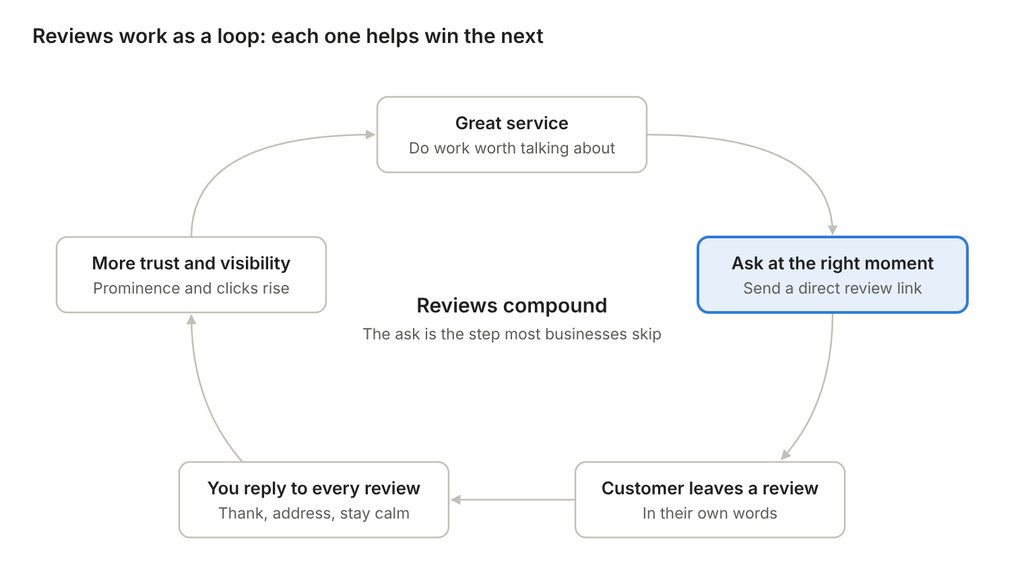
Most businesses deliver good service and then never ask. That one missing step is why a great company with 12 reviews loses to an average one with 300.
How to get more reviews (the right way)
- Ask at the peak moment. Right after a job is finished, a problem is solved, or a customer thanks you. Not three weeks later in a generic email.
- Make it one tap. Copy the review link from your profile dashboard and send it by text or email. Print a QR code for your counter, invoices or job sheets.
- Ask everyone. Google prohibits “review gating” (only asking happy customers). Ask every customer the same way.
- Never pay or offer incentives. Discounts or gifts in exchange for reviews break Google’s policies and can get reviews removed or your profile restricted. Buying reviews is worse.
- Build it into your process. Make the review request a step in your job close-out checklist, so it happens every time without anyone remembering to do it.
How to respond to reviews
Reply to every review, good and bad. It shows future customers you care, and it keeps your profile active.
For positive reviews, thank the person by name and mention the specific service when it fits naturally: “Thanks, Maria! Glad the water heater install went smoothly.” Keep it short and human.
For negative reviews, stay calm and keep it brief. Acknowledge the problem, apologize for the experience, and move the conversation offline: “We’re sorry this happened. Please call our office manager at [number] so we can make it right.” Future customers read your reply more than the complaint. A thoughtful response often wins more trust than a perfect five-star record.
If a review is fake or breaks Google’s policies, report it from your dashboard. Don’t argue with the reviewer in public.
Google My Business Posts SEO: Keep the Profile Active
Posts are short updates that appear on your profile, like a mini social feed. They’re unlikely to jump you from #15 to #1 on their own. But they help in three real ways: they signal an active business, they give searchers fresh reasons to choose you, and they let you promote specific services and offers right in the search results.
There are three main post types:
- Updates: news, tips, recent projects, new services.
- Offers: a discount or promotion with dates and terms.
- Events: workshops, open houses, seasonal sales, with a start and end date.
What makes a post worth publishing
- One topic per post. Pick a single service, project or offer.
- Lead with the benefit. The first line is often all people see. “Same-day AC repair in Kendall this week” beats “Check out our services!”
- Use a real photo. A finished job or your team beats a stock graphic every time.
- Add a clear button. Call, Book, Learn more or Get offer, pointing to the matching page on your website.
- Post consistently. One good post a week is a realistic rhythm for most businesses. Consistency matters more than volume.
Good post ideas: a recent job with a before-and-after photo, an answer to a question customers ask all the time, a seasonal reminder (“Book your furnace check before the first cold snap”), a new team member or certification, or a limited-time offer.
What happened to Questions & Answers?
Google has retired the Questions & Answers section on business profiles. Google discontinued the Q&A API on November 3, 2025, and the public section has since disappeared from profiles (details). Instead, Google increasingly uses AI to answer questions about your business, pulling from your profile, your website and your reviews.
That changes your job. You can no longer post your own answers on Google. You can control what Google reads before it answers:
- Fill in every profile field and attribute, so basic answers (parking, payment, accessibility, hours) come straight from you.
- Build a real FAQ page on your website that answers the questions customers actually ask.
- Keep your services and descriptions accurate, so the AI doesn’t guess.
If the information isn’t written down somewhere you own, Google will fill the gap from whatever it can find.
Google My Business Website SEO: Make Your Site Back Up Your Profile
Your profile and your website are a team. The profile wins the map. The website proves to Google that the profile is accurate, relevant and trustworthy. Businesses that rank in the local pack year after year almost always have both working together.
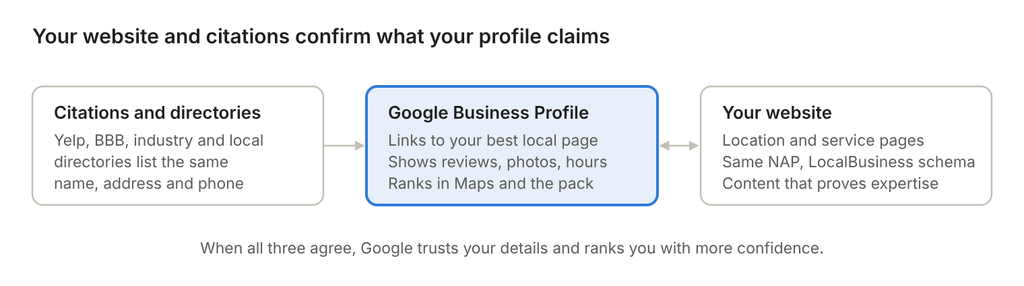
Link your profile to the right page
If you have one location, link your profile to your homepage or your strongest service page. If you have several, link each profile to its own location page. That page should match the profile: same name, address, phone, hours and services.
Tip: add tracking parameters (UTM tags) to the website link on your profile. Then you can see exactly how many visitors and leads come from Google Business Profile in your analytics.
On-page SEO that supports local rankings
The page your profile links to should clearly answer “what do you do, and where?” A few essentials:
- Title tag and H1 that include your main service and city, for example “Managed IT Services in Santo Domingo.”
- Your NAP in the footer or contact section, matching your profile exactly.
- An embedded map of your location.
- A page for each core service that matches the services listed on your profile. A profile service called “Drain Cleaning” backed by a full drain cleaning page is a strong relevance signal.
- LocalBusiness schema markup, structured data that spells out your name, address, hours and contact details for search engines.
- Real proof: reviews, case studies, photos of your work, certifications.
If you’re not sure your pages are set up correctly, our on-page SEO services cover titles, content structure, schema and internal linking.
Build citations and local links
Citations are listings of your business on other sites: directories, industry associations, chambers of commerce, review platforms. Start with the major ones in your country and industry, and make sure every listing uses identical details.
Local links go a step further. A link from your chamber of commerce, a local news story, a community event you sponsored or a supplier’s partner page tells Google you’re a real, established part of the community. These links feed prominence for both your website and your profile.
This is where Google local business SEO and traditional SEO overlap. The stronger your website’s overall authority, the easier it is for your profile to rank. Our full SEO services handle both sides together.
Multi-Location and Franchise Profiles
Every physical location that serves customers face to face can have its own profile. Each one ranks on its own, for the searches near it. That means five locations need five well-optimized profiles, not one good one and four empty ones.
The extra challenges with multiple locations:
- Consistency at scale. Brand name, categories and core services should match across locations, while hours, phone numbers, photos and reviews are local.
- One location page per profile. Each profile should link to its own page on your site, with that location’s address, map, team and local reviews. Linking every profile to the homepage wastes a strong relevance signal.
- Duplicates. Moves, rebrands and old listings create duplicate profiles that split reviews and confuse Google. Find and merge or remove them.
- Who has access. Use a business group in your dashboard to manage locations centrally, and give local managers limited access so they can respond to reviews and add photos.
- Review volume across locations. A system that asks for reviews at every location keeps weaker locations from falling behind.
For franchises, the tension is between brand control and local relevance. Corporate wants a consistent brand. Each franchisee needs a profile that feels local and active. The best setups give corporate control over names, categories and brand assets, and give franchisees a simple routine for photos, posts and review replies.
If you manage a growing network of locations, our franchise SEO services are built for exactly this balance.
How to Track Your Results
You can’t improve what you don’t measure. Track three things every month.
1. Profile performance. Your Business Profile dashboard shows how many people found you, and what they did next: calls, direction requests, website clicks and bookings. These actions matter more than raw views. A profile with fewer views but more calls is winning.
2. Local rankings by location. Your ranking changes block by block. Someone two streets away may see you first, while someone across town doesn’t see you at all. Geo-grid rank trackers check your position from many points on a map, so you see where you’re strong and where you disappear.
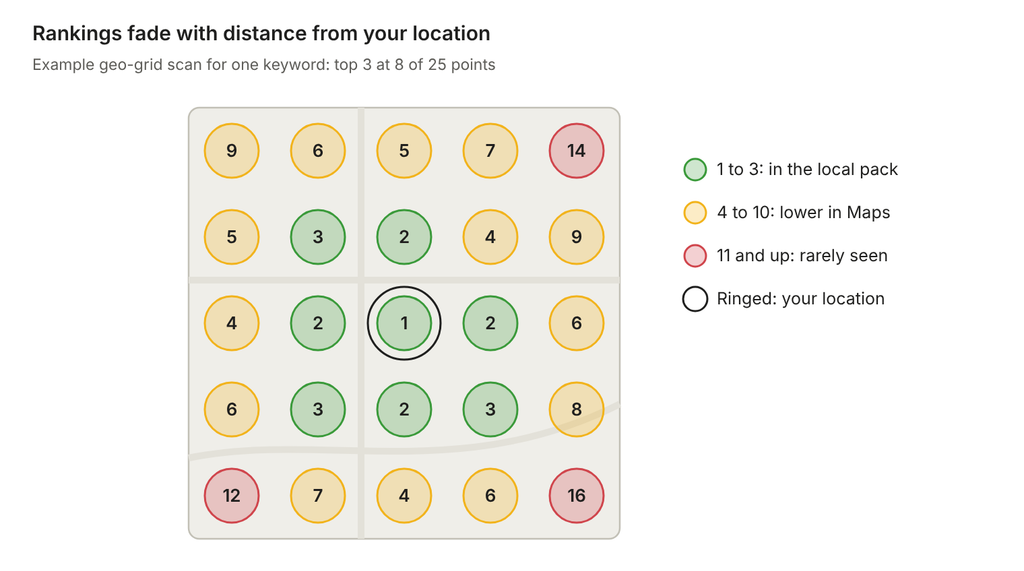
A scan like this tells you where to focus. Strong in the center but weak on one side? That’s often where a competitor with more reviews or a better category match is winning.
3. Leads and revenue. Use UTM tags on your profile link and a tracked phone number on your website so you can tie calls and forms back to Google Business Profile. That’s how you prove the work is paying off.
10 Google Business Profile Mistakes to Avoid
- Stuffing keywords into your business name. It risks suspension and isn’t worth it.
- Picking a broad primary category when a specific one exists.
- Leaving services, attributes or the description empty. Every blank field is a missed relevance signal.
- Using a virtual office or fake address to appear in another city.
- Inconsistent NAP across your website and directories.
- Ignoring reviews, both asking for them and replying to them.
- Offering incentives for reviews or only asking happy customers.
- Uploading stock photos instead of real images of your business.
- Linking every location to the homepage instead of dedicated location pages.
- Set it and forget it. A profile that hasn’t changed in a year looks abandoned to customers, and gives Google nothing new to work with.
Your 30-Day Google Business Profile SEO Plan
Don’t try to do everything in one afternoon. Here’s a realistic order that puts the highest-impact work first.
Week 1: Foundations
- Claim and verify your profile
- Choose the most specific primary category and relevant secondary categories
- Correct your business name, address or service area, phone and hours
- Check that your NAP matches your website exactly
Week 2: Content
- Add every service and product, with descriptions
- Write a clear 750-character description
- Select every attribute that applies
- Upload 10 to 20 real photos: exterior, interior, team, work
Week 3: Reviews
- Copy your review link and create a QR code
- Add a review request step to how you close every job
- Reply to every existing review you haven’t answered
Week 4: Website and momentum
- Link the profile to the right page, with UTM tracking
- Update that page’s title, H1, NAP, map and schema
- Publish your first weekly post
- Run a baseline rank scan so you can measure progress
After that, the routine is simple: one post a week, new photos every month, a review request after every job, and a monthly check on rankings and calls.
Frequently Asked Questions
How long does Google Business Profile SEO take to work? Small fixes like categories and services can show changes within a few weeks. Building review volume and authority takes months. Most businesses see meaningful movement in three to six months of steady work.
Does Google My Business help SEO for my website too? Indirectly, yes. Your profile sends traffic to your site and confirms your business details. But website rankings still depend on your site’s content, technical health and links.
Is GMB SEO different from local SEO? Google Business Profile SEO is one part of local SEO. Local SEO also includes your website’s local pages, citations, local links and content.
Can I rank in a city where I don’t have an address? Not in the map pack, in most cases. Distance is a core ranking factor. You can rank your website for other cities with strong service-area pages, but faking an address to appear on the map breaks Google’s rules.
Should I hire someone to manage my profile? If you have time to follow the 30-day plan and keep the routine going, you can do this yourself. If you’d rather spend that time running your business, or you’re in a competitive market, professional help usually pays for itself in leads.
Ready to Get More Calls From Google?
Your Google Business Profile is often the first impression a customer has of your business. When it’s complete, active and backed by a strong website, it becomes one of your most reliable sources of new customers.
At Social Marketway, we handle the whole picture: profile optimization, review systems, local pages and the website SEO that supports them. Compare our SEO packages to see what fits your business, or learn more about our local SEO services.
Want to know exactly where your profile stands? Contact us today for a free Google Business Profile audit. We’ll show you what’s holding your rankings back, and the fastest way to fix it.