

Benefits of Google Ads: 10 Reasons It Pays Off

Every day, people type exactly what they want to buy into Google. A homeowner searches “emergency plumber near me.” A CFO searches “payroll software for 50 employees.” The business that shows up first, at that moment, usually wins the customer.
That is the core promise of Google Ads, and it is why the platform remains the backbone of most paid marketing budgets in 2026. Google still handles roughly 90% of all searches worldwide, and more than 95% on mobile, according to StatCounter data from April 2026. No other ad platform puts you in front of that much buying intent.
But “reach” alone doesn’t explain why businesses keep investing. In this guide, we break down the 10 biggest benefits of Google Ads, back each one with current data, and help you decide whether Google Ads is the right fit for your business.
The 10 benefits of Google Ads at a glance:
- Results in days, not months
- You reach people at the exact moment of intent
- Unmatched audience reach across Search, YouTube, Maps and more
- Precise targeting by keyword, location, device, time and audience
- Full control over your budget and costs
- Measurable, trackable ROI
- Flexibility to test and change strategy instantly
- Brand awareness that compounds your other marketing
- Remarketing that brings back lost visitors
- AI and automation that scale what works
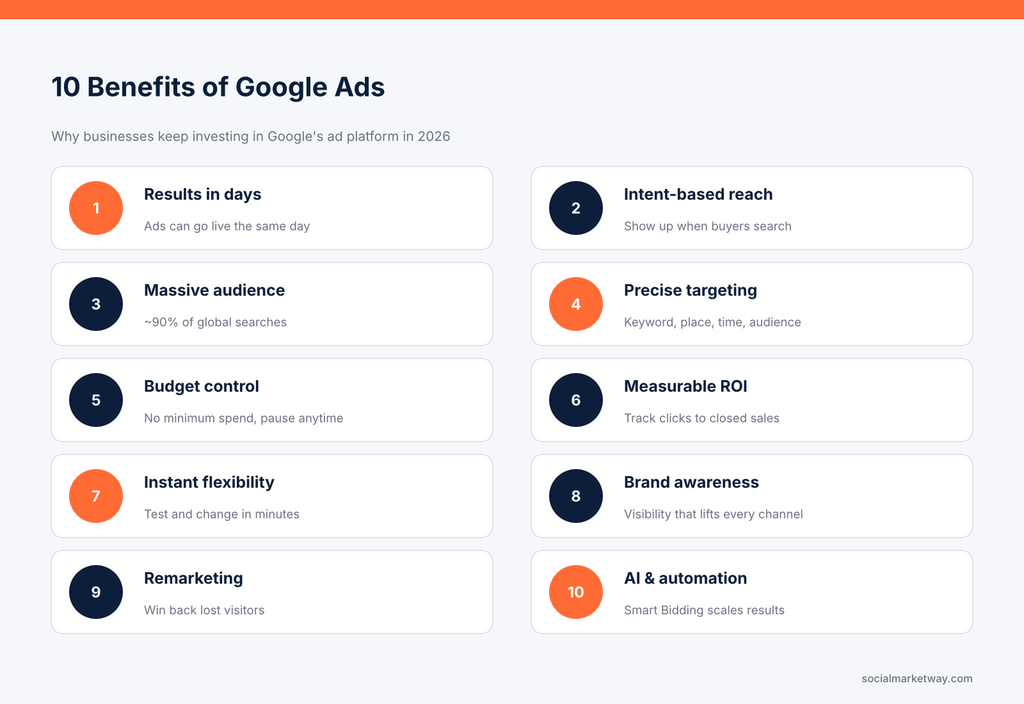
Alt text: Infographic listing the 10 benefits of Google Ads, from fast results to AI automation
What Is Google Ads and How Does It Work?
Google Ads (formerly Google AdWords) is Google’s online advertising platform. It lets businesses show ads on Google Search, Google Maps, YouTube, Gmail, Google Shopping and millions of partner websites and apps in the Google Display Network.
Most Google Ads campaigns run on a pay-per-click (PPC) model. You only pay when someone clicks your ad, not when it is simply shown. That single detail is what makes the platform so efficient compared with traditional media.
Here’s what happens behind the scenes every time someone searches:
- A search triggers an auction. When a user searches a keyword you bid on, Google runs an instant auction among every eligible advertiser.
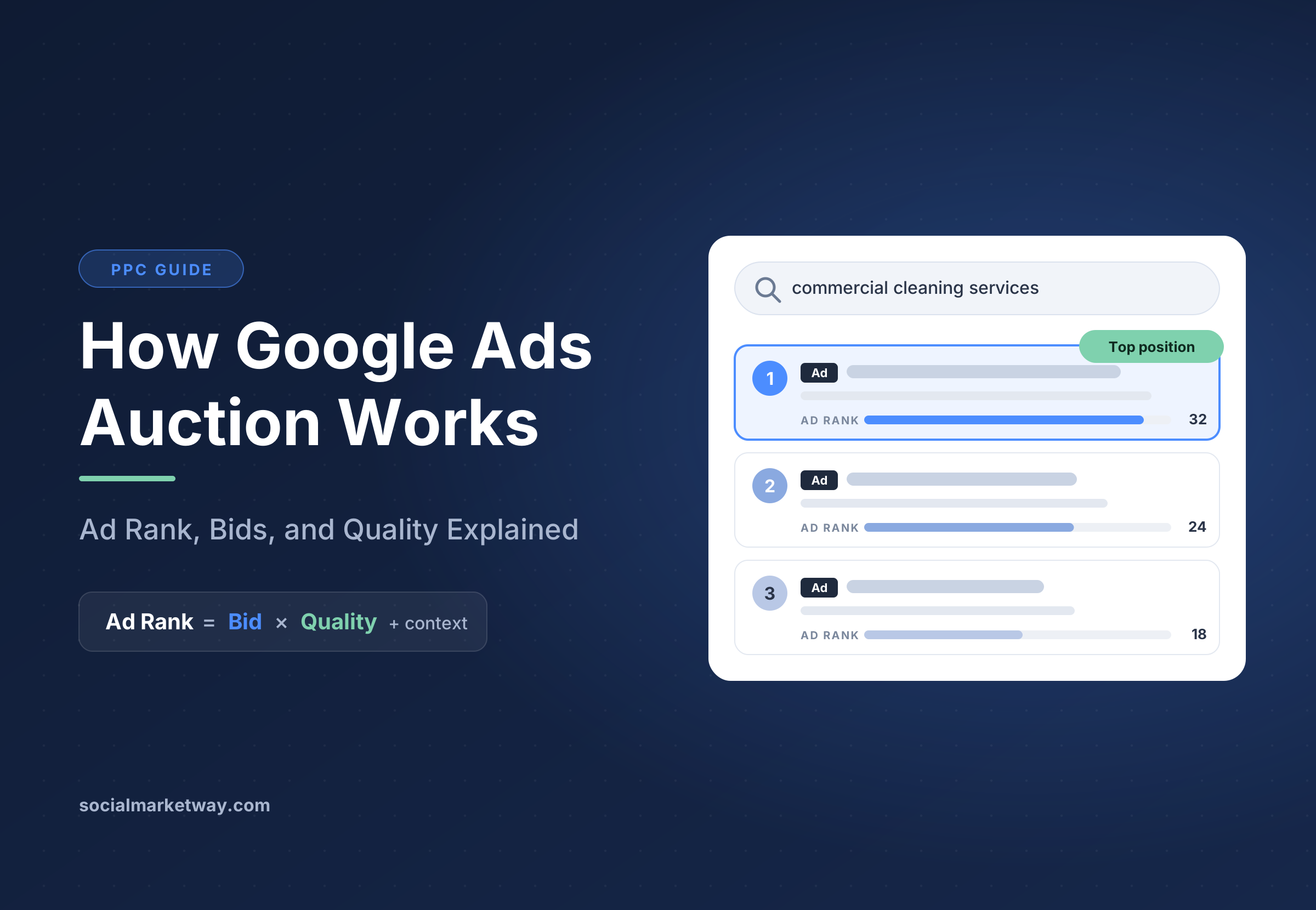
- Google calculates Ad Rank. Ad Rank is based on your bid, your ad’s quality (expected click-through rate, ad relevance and landing page experience) and the expected impact of ad assets like sitelinks and callouts.
- The highest Ad Rank wins the best position. This means the biggest budget doesn’t automatically win. A relevant ad with a strong landing page can outrank a competitor that bids more.
- You pay only if the user clicks. And thanks to the auction design, you usually pay less than your maximum bid.
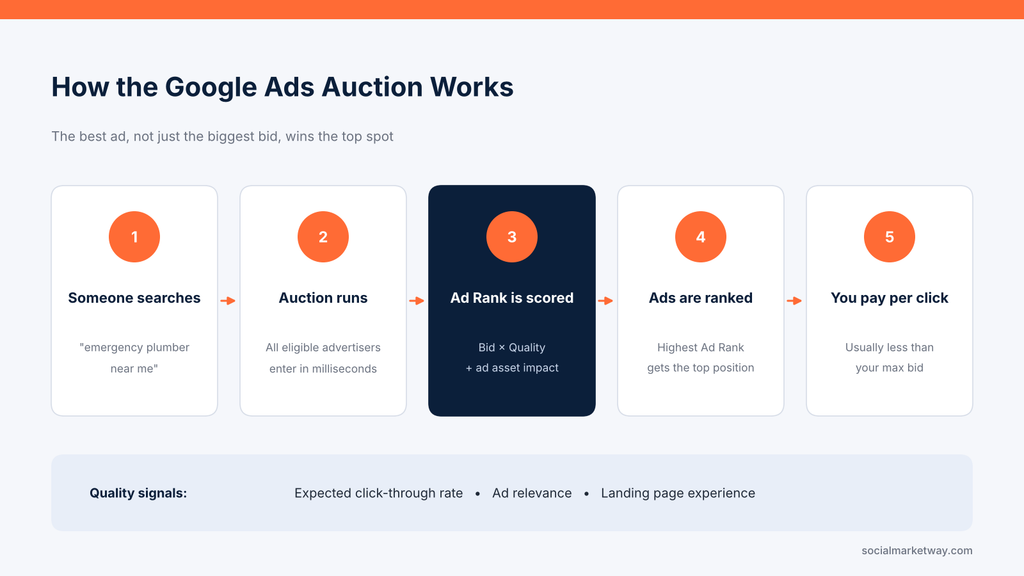
Alt text: Five-step diagram of the Google Ads auction, from a search to Ad Rank to paying per click
This quality-first system is one of the most underrated advantages of Google Ads. It rewards businesses that create genuinely helpful ads and landing pages, which levels the playing field for smaller brands.
Are Google Ads Worth It?
Yes, for most businesses with a clear offer and a working website, Google Ads is worth it. Google’s own economic impact research estimates that businesses earn about $8 in profit for every $1 they spend on Google Ads.
It’s worth understanding where that number comes from, because it is often misquoted. Google assumes advertisers make about $2 in profit for every $1 spent on ads. It then assumes businesses get roughly five organic clicks for every ad click, and credits part of that organic value to the combined presence of Search and Ads. The result is the $8 figure.
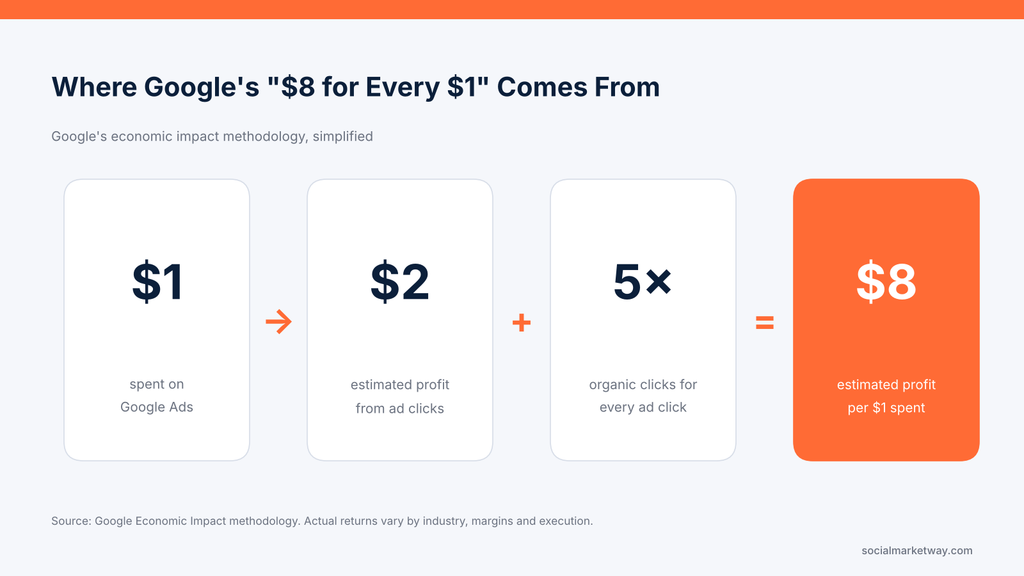
Alt text: Graphic explaining Google’s estimate of $8 profit for every $1 spent on Google Ads
The practical takeaway: your ad clicks should pay for themselves, and the visibility they create lifts the rest of your search presence too. Real results depend on your industry, margins and execution, so use benchmarks as a guide and your own data as the final word.
10 Benefits of Google Ads for Businesses
Whether you run a local service business, an ecommerce store or a B2B company, these are the advantages of Google Ads that matter most.
1. Get Results in Days, Not Months
Speed is the benefit businesses notice first. Once your campaign is approved, your ads can appear at the top of Google the same day. Many advertisers see their first clicks, calls and leads within the first week.
Compare that with organic search. Search engine optimization builds long-term, compounding traffic, but new pages often take three to six months or more to rank for competitive terms.
That’s why the smartest strategy isn’t “Google Ads or SEO” but both. Ads generate revenue and keyword data now, while SEO services build the organic foundation that lowers your cost per acquisition over time.
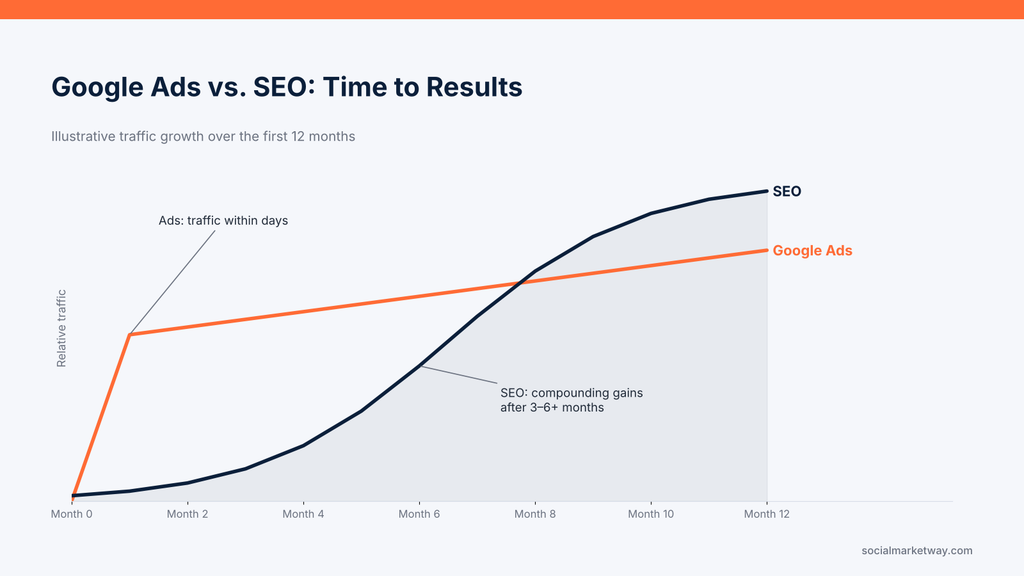
Alt text: Line chart comparing how quickly Google Ads and SEO generate traffic over 12 months
Best for: product launches, seasonal promotions, new websites and businesses that need leads this month.
2. Reach Customers at the Exact Moment of Intent
Most advertising interrupts people. Social ads appear while someone is scrolling photos; TV ads play during a show. Google Ads is different because the customer starts the conversation.
When someone searches “best CRM for small business” or “roof repair cost,” they’re telling you what they need right now. Your ad answers that need. This is why search ads tend to convert so well: WordStream’s 2025 benchmark study of more than 16,000 campaigns put the average Google Ads conversion rate at 7.52% across industries.
To make the most of intent, group keywords by where buyers are in their journey:
- High intent: “buy,” “near me,” “pricing,” “quote,” “hire”
- Comparison intent: “best,” “vs,” “reviews,” “alternatives”
- Research intent: “how to,” “what is,” “ideas”
Start budgets on high-intent terms, then expand as your conversion data grows.
3. Unmatched Reach Across Google’s Ecosystem
Google processes billions of searches a day and holds about 90% of the global search market. In the U.S. and on mobile, its lead is just as strong.
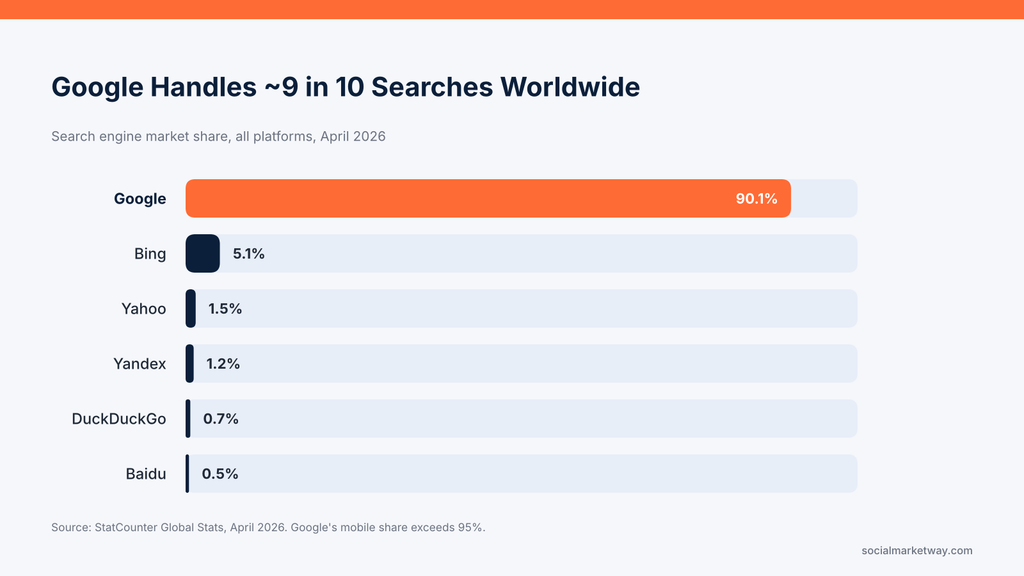
Alt text: Bar chart showing Google with 90.1% of global search market share in April 2026
And Google Ads reaches far beyond the search results page. A single account can run:
- Search campaigns — text ads on Google results
- Shopping campaigns — product listings with images and prices
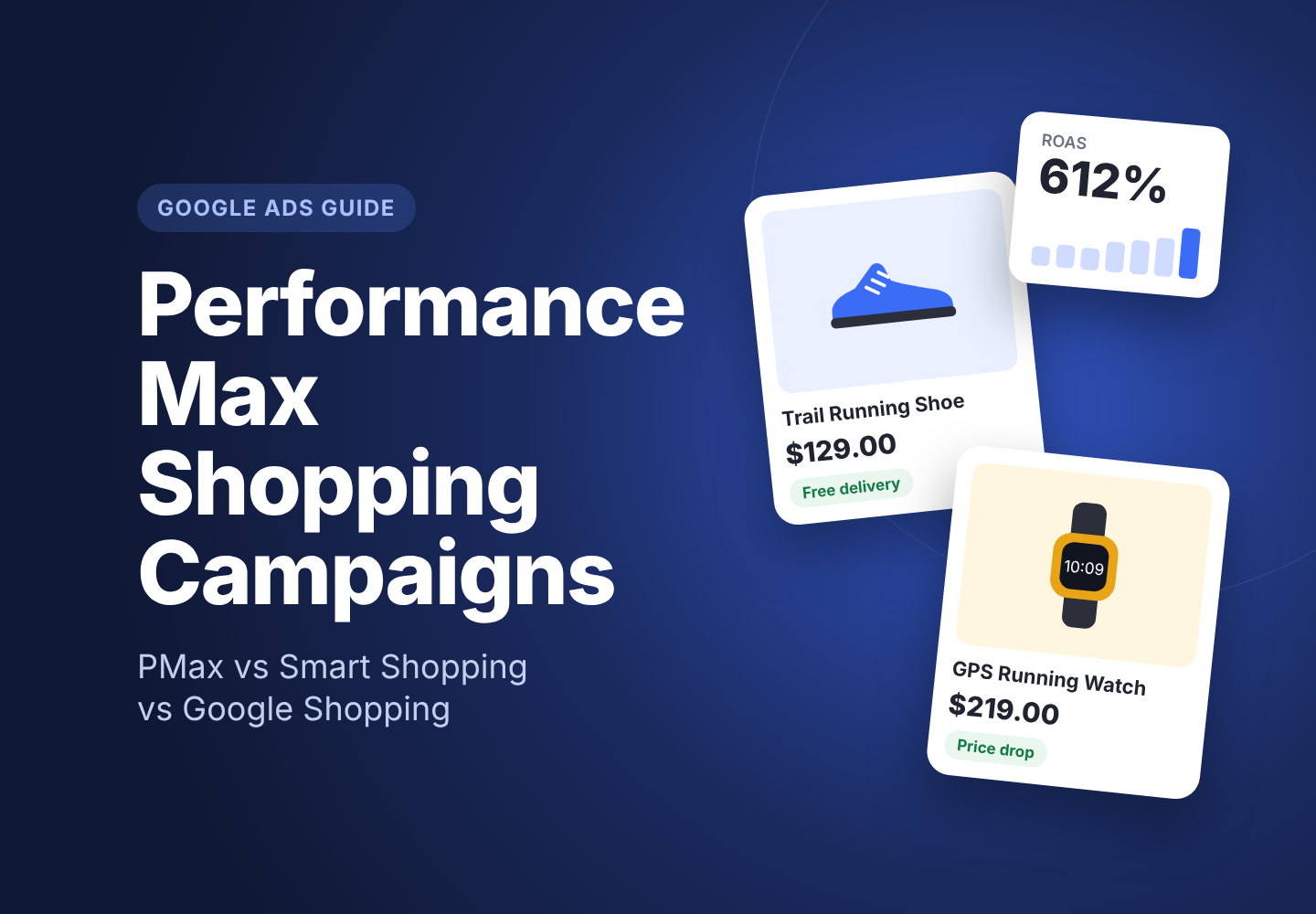
- Performance Max — one campaign across Search, YouTube, Display, Gmail, Maps and Discover
- Demand Gen — visual ads on YouTube, Discover and Gmail
- Video campaigns — YouTube ads, from 6-second bumpers to long-form
- Display campaigns — banner ads across millions of websites and apps
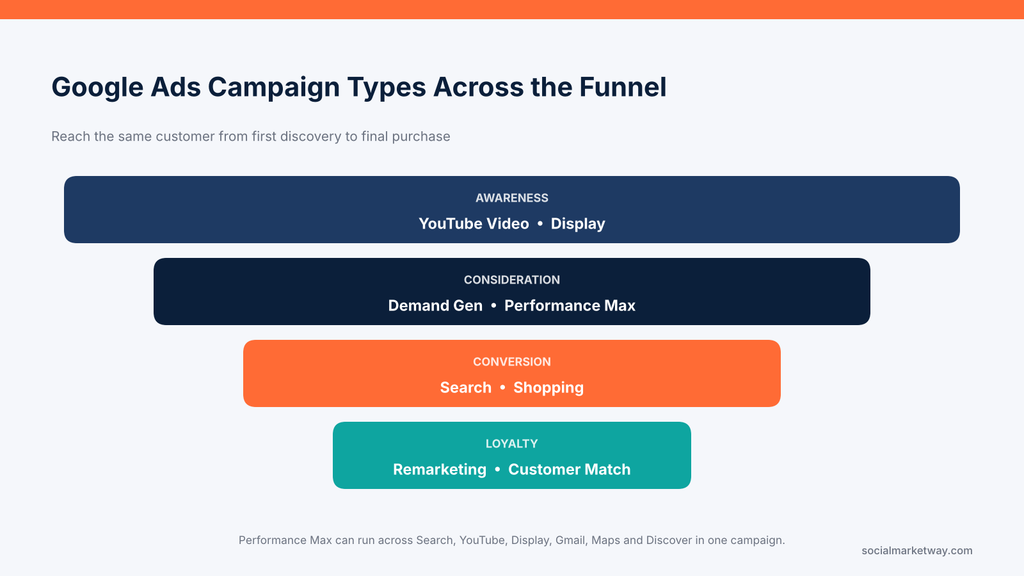
Alt text: Funnel diagram mapping Google Ads campaign types to awareness, consideration, conversion and loyalty
This breadth means you can reach the same customer at every stage, from first discovery on YouTube to final purchase on Search.
4. Target Exactly Who You Want (and Exclude Who You Don’t)
Google Ads targeting goes far deeper than keywords. You can layer several controls to make sure your budget reaches the right people:
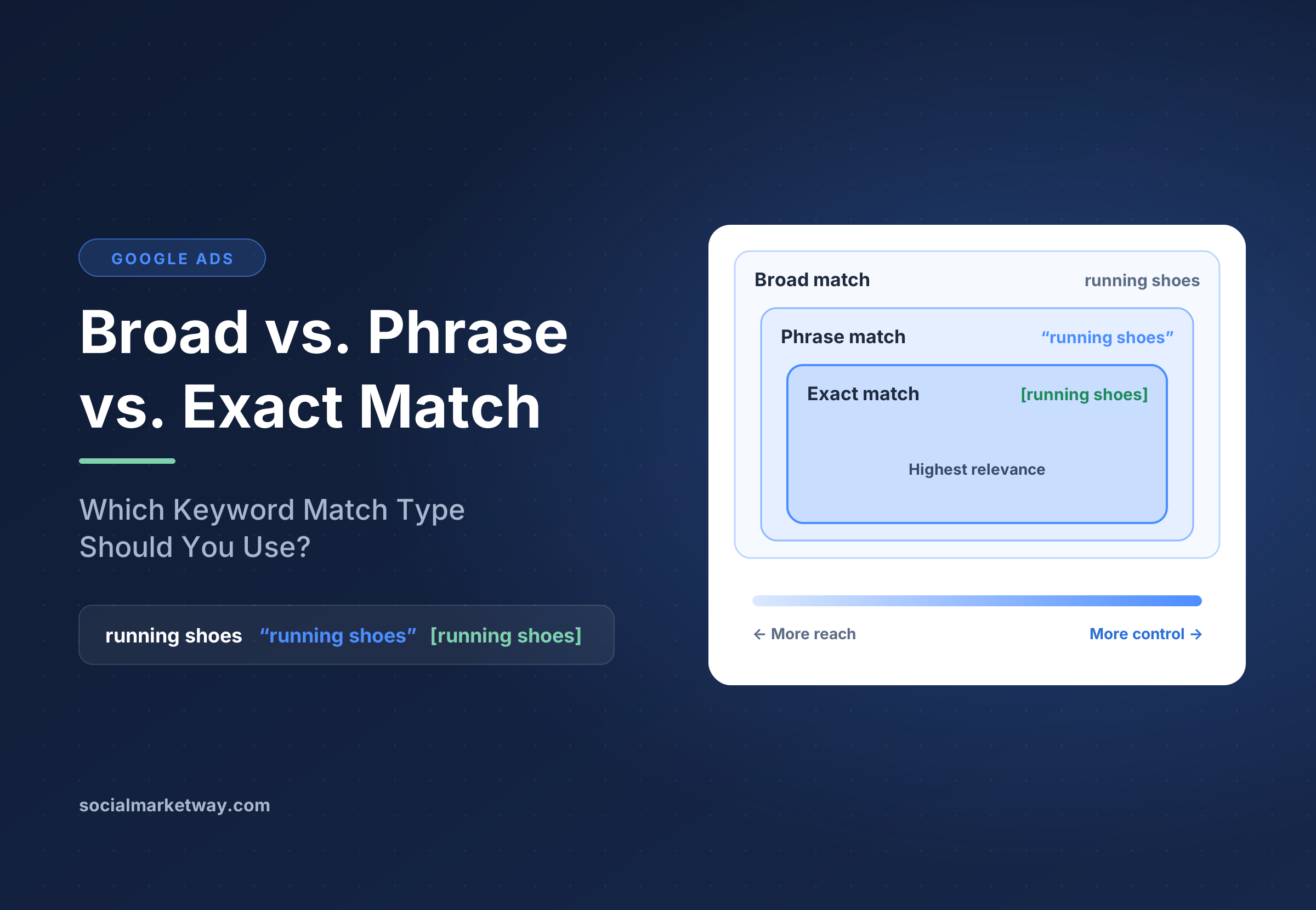
- Keywords and match types: broad, phrase and exact match control how closely a search must match your terms.
- Location: target a country, a city, a ZIP code or a radius around your store.
- Device: adjust bids for mobile, desktop or tablet.
- Ad schedule: show ads only during business hours, or bid more when leads convert best.
- Audiences: target by demographics, interests, in-market behavior, life events or your own customer lists.
- Exclusions: negative keywords and excluded audiences stop wasted clicks before they happen.
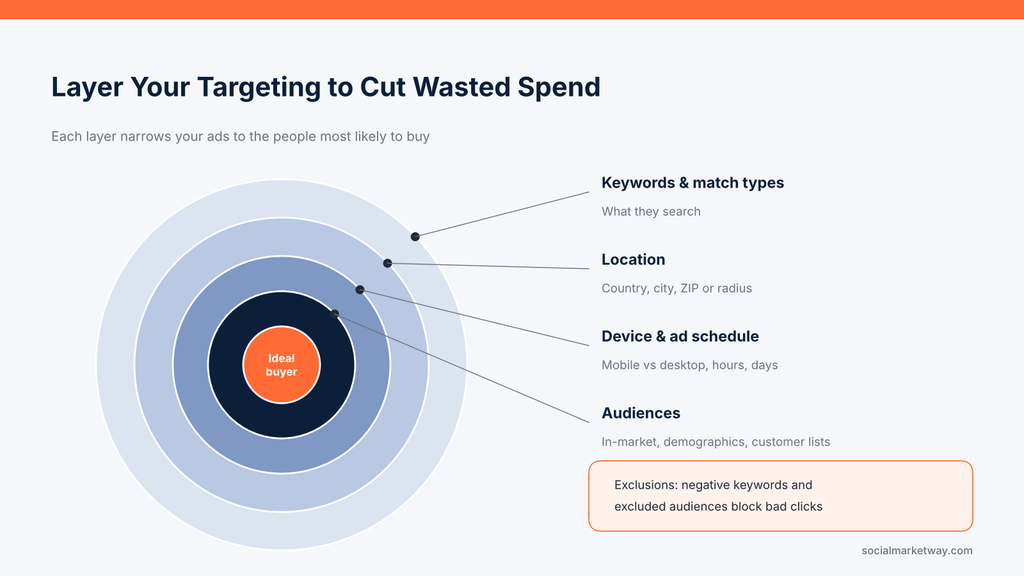
Alt text: Concentric targeting diagram showing keywords, location, device, schedule and audience layers in Google Ads
For example, a dental practice can show ads only to people within 10 miles, between 7 a.m. and 7 p.m., who search for “emergency dentist,” while excluding searches for “dental school” or “dentist salary.”
5. Total Control Over Your Budget
There’s no minimum spend in Google Ads. You set a daily budget, choose how you want to bid and can pause, raise or lower spend at any time.
You also choose your bidding strategy based on your goal:
- Maximize clicks to grow traffic
- Maximize conversions or target CPA to generate leads at a set cost
- Target ROAS to hit a specific return on ad spend for ecommerce
- Manual CPC for full control over individual keyword bids
Costs do vary by industry. The 2025 average cost per click across industries was $5.26, but legal services averaged $8.58 while many retail niches stay well under that. The key is to compare what you pay per lead or sale with what that customer is worth.
Budget control is only a benefit if the budget is used well. A professional Google Ads management team can audit search terms weekly, cut wasted spend and move budget to the campaigns that drive revenue.
6. Measure Everything and Prove ROI
With a billboard or radio spot, you guess how many customers it brought in. With Google Ads, you know.
Conversion tracking shows which keyword, ad and audience produced each lead, call, form fill or purchase, and what it was worth. Connect Google Analytics 4 and your CRM, and you can follow a click all the way to closed revenue.
The key metrics to watch, with 2026 cross-industry averages from WordStream:
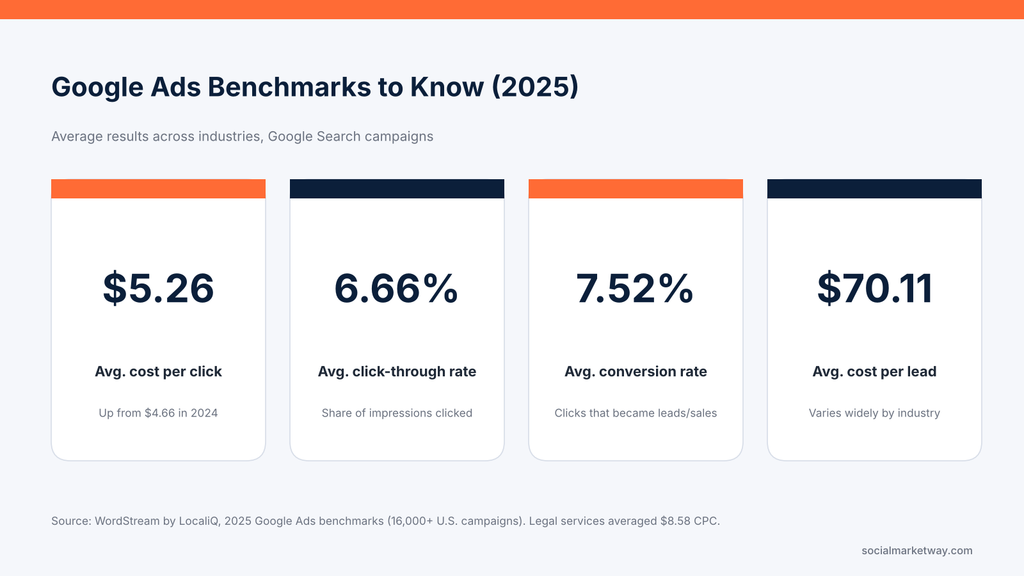
Alt text: Google Ads 2025 benchmarks: $5.26 average CPC, 6.66% CTR, 7.52% conversion rate, $70.11 cost per lead
Use these as a starting point, not a target. A $70 cost per lead is expensive for a pizza shop and a bargain for a law firm. What matters is that every number is visible, so every decision is based on data instead of gut feeling.
7. Change Your Strategy Instantly
Traditional advertising locks you in. A print ad is printed; a billboard is up for months. Google Ads lets you change almost anything in minutes:
- Rewrite headlines when a competitor changes their offer
- Pause a product that’s out of stock
- Shift budget to the ad group with the lowest cost per lead
- Launch a weekend sale campaign on Friday afternoon
It’s also a built-in testing lab. Responsive search ads automatically test up to 15 headlines and 4 descriptions, and the Experiments feature lets you A/B test bidding strategies or landing pages against your current setup. The messaging that wins in ads can then inform your website, emails and sales scripts.
8. Build Brand Awareness That Lifts Every Channel
Even people who don’t click see your brand name at the top of Google. Over time, that repeated visibility builds familiarity and trust, which makes people more likely to click your organic listings, open your emails and choose you over an unknown competitor.
Google Ads offers several ways to grow awareness:
- Brand campaigns that protect your name when competitors bid on it
- YouTube video ads that tell your story with sight and sound
- Display and Demand Gen ads that keep your brand visible across the web
Google Ads works best as part of a wider paid media strategy where search, social and video ads support each other instead of competing for the same budget.
9. Bring Back Visitors With Remarketing
Most visitors leave a website without buying or booking. Remarketing gives you a second chance.
With Google Ads remarketing, you can show tailored ads to people who visited your site, abandoned a cart or watched your YouTube videos. You can also use remarketing lists for search ads (RLSA) to bid higher when a past visitor searches for your products again.
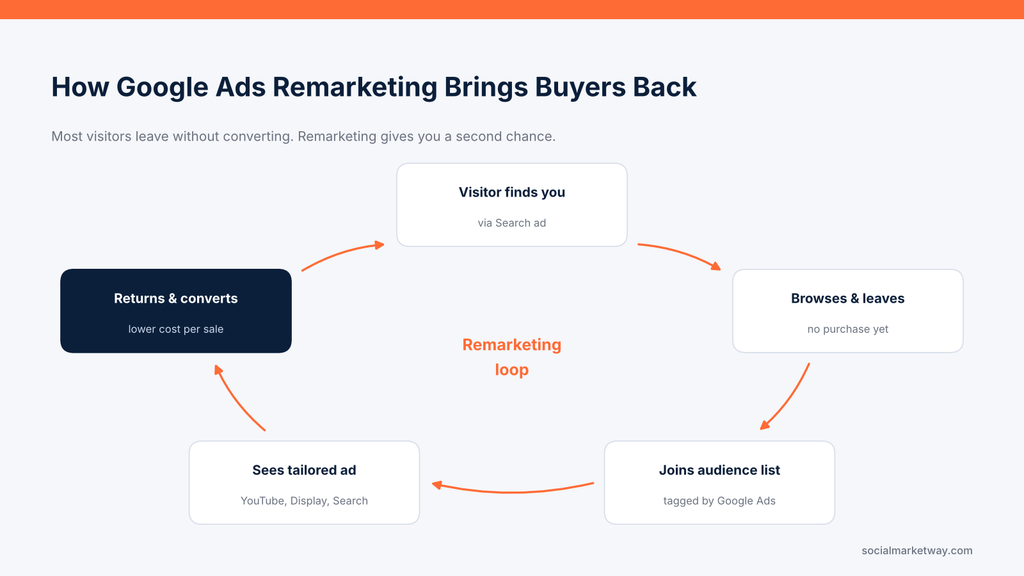
Alt text: Cycle diagram showing how Google Ads remarketing brings website visitors back to convert
Because these people already know you, remarketing typically delivers lower costs per conversion than prospecting campaigns. Try offering a reason to return, like a limited-time discount, free consultation or customer testimonial.
10. AI and Automation That Scale What Works
Google Ads now uses machine learning throughout the platform. Smart Bidding adjusts every bid in real time based on signals like device, location, time and past behavior. Performance Max uses your goals and creative assets to find converters across all of Google’s channels. Broad match paired with Smart Bidding can uncover profitable search terms you’d never have thought of.
The benefit is scale: automation handles millions of micro-decisions no human could. The catch is that AI only optimizes toward the data you give it. Accurate conversion tracking, strong creative and clear business goals are what turn automation from a budget drain into a growth engine.
Google Ads vs. SEO vs. Traditional Advertising
How do the benefits of Google advertising stack up against other ways to get customers? Here’s a side-by-side view.
| Factor | Google Ads | SEO | Traditional ads (TV, print, billboards) |
|---|---|---|---|
| Time to results | Same day to 1 week | 3–6+ months | Weeks to months |
| Cost model | Pay per click | Ongoing content and technical investment | Large upfront fixed cost |
| Targeting | Keyword, location, device, time, audience | Keyword and topic | Broad geography and demographic |
| Customer intent | Active searchers | Active searchers | Passive viewers |
| Measurement | Click-to-sale tracking | Rankings, traffic, conversions | Estimates and surveys |
| Flexibility | Change anytime | Gradual | Locked in once bought |
| When it stops | Traffic stops when spend stops | Traffic keeps compounding | Exposure ends with the flight |
The pattern is clear: Google Ads wins on speed, control and measurement, while SEO wins on long-term cost efficiency. Businesses that run both own more of the search results page and learn faster, because paid keyword data shows which terms are worth targeting organically.
Is Google Ads Right for You? A Quick Checklist
Google Ads is likely a strong fit if you can say yes to most of these:
- People actively search for your product or service on Google
- A new customer is worth more than a few clicks’ cost (check your industry’s CPC)
- You have a fast, mobile-friendly landing page with one clear action
- You can track leads, calls or sales back to their source
- You can commit a test budget for at least 60–90 days so the data can mature
- You can answer leads quickly once they come in
If several boxes are unchecked, fix those first. Ads amplify what’s already there, so a slow site or an unanswered phone will waste budget no matter how good the campaign is.
How to Maximize the Benefits of Google Ads
The platform offers the benefits; execution decides whether you get them. WordStream’s analysis of more than 15,000 accounts found that nearly 29% recorded zero conversions over 90 days. These are the mistakes behind most of those failures, and how to avoid them.
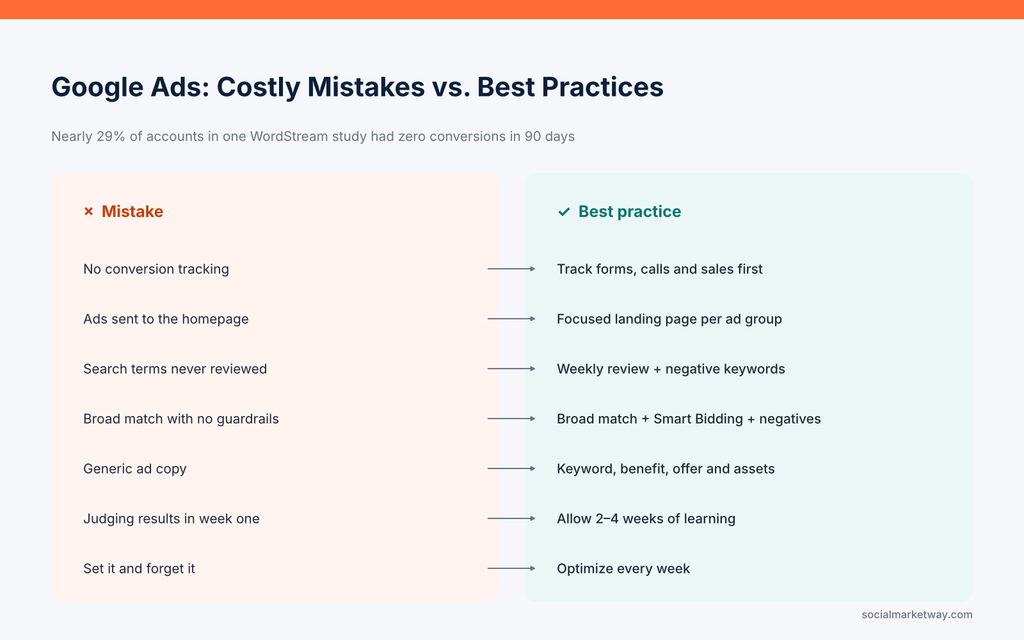
Alt text: Comparison of common Google Ads mistakes and the best practices that fix them
- Skipping conversion tracking. Without it, Smart Bidding is flying blind. Set up tracking for forms, calls and purchases before you spend a dollar.
- Sending traffic to the homepage. Match every ad group to a focused landing page that repeats the searcher’s keyword and offers one clear next step.
- Ignoring the search terms report. Review it weekly and add negative keywords to block irrelevant searches.
- Running broad match without guardrails. Pair broad match with Smart Bidding, solid conversion data and a negative keyword list.
- Writing generic ads. Use all your headline slots, include the keyword, a clear benefit and a reason to act now. Add sitelinks, callouts and call assets.
- Judging too early. Give new campaigns two to four weeks to exit the learning phase before making major changes.
- Set it and forget it. Auctions, competitors and costs change constantly. Accounts that are optimized weekly consistently outperform those left alone.
If you’d rather spend your time running your business, an experienced Google Ads management partner can handle setup, tracking and ongoing optimization for you.
Frequently Asked Questions About Google Ads
What are the main benefits of Google Ads?
The main benefits of Google Ads are fast results, access to high-intent searchers, huge reach, precise targeting, full budget control, measurable ROI, flexibility, brand awareness, remarketing and AI-powered optimization.
How much does Google Ads cost?
There’s no minimum budget. The 2025 average cost per click across industries was $5.26, but it ranges from under $2 in some retail niches to $8 or more in legal and finance. Many small businesses start testing with $1,000–$3,000 a month.
How long does it take to see results from Google Ads?
Ads can start showing the same day they’re approved. Most campaigns produce meaningful data within two to four weeks and become well optimized within about three months.
Is Google Ads good for small businesses?
Yes. Because you control your budget, target by location and only pay for clicks, small businesses can compete for local customers without the large upfront cost of traditional advertising.
Should I use Google Ads or SEO?
Ideally both. Google Ads delivers immediate traffic and data, while SEO builds lasting organic visibility. Together they help you own more of the search results page.
Start Getting the Benefits of Google Ads
Google Ads puts your business in front of customers at the exact moment they’re looking for what you sell, and lets you measure every dollar along the way. The benefits are real, but they come from a well-built account: the right keywords, sharp ads, focused landing pages and constant optimization.
That’s where Social Market Way comes in. Our paid media team builds and manages Google Ads campaigns designed around one goal: profitable growth for your business.
Ready to see what Google Ads can do for you? Contact Social Market Way for a free Google Ads consultation and account review.